User review
Debt Payoff
Having a clear picture of what I owe has made paying down debt feel much more manageable. I like being able to see my balances change over time. It gives me a little extra motivation every time I make a payment.
Explore a repayment path · Google Sheets
Compare snowball and avalanche payment priorities. Explore estimated payoff time, estimated interest and how extra payments change the balance curve.
Free · personal use
Free for personal use. No payment or email required. Copy directly to Google Sheets, or import the downloaded .xlsx file into Google Sheets. Desktop Google Sheets is the supported editor.

Estimates use fixed APR divided by 12, monthly interest rounded to cents, month-end payments and fixed original minimums. No new borrowing, fees or rate changes; outcomes are not guaranteed.
This example includes three debts and $150 in extra monthly payments:
| Debt | Starting balance | APR | Minimum payment |
|---|---|---|---|
| Card A | $1,200 | 24.9% | $50 |
| Car loan | $8,000 | 6% | $240 |
| Card B | $3,000 | 29.9% | $100 |
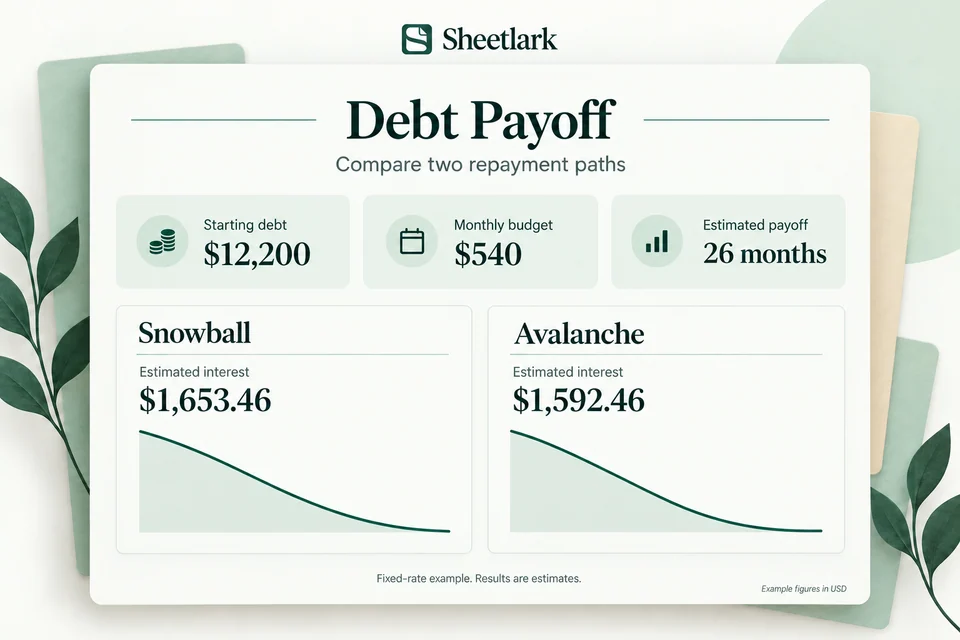
Minimum payments total $390. Adding $150 gives a monthly payment budget of $540.
Snowball starts with the smallest balance, Card A. Avalanche starts with the highest interest rate, Card B. With these inputs, both estimates reach payoff in 26 months. Estimated interest is $1,653.46 for snowball and $1,592.46 for avalanche.
These results use fictional debts and a simplified monthly calculation: fixed APRs, interest calculated at APR divided by 12, month-end payments, fixed original minimum payments, and payments rolled into the remaining debts as balances are paid off. The model does not include fees, new borrowing or changing rates. Actual lender calculations and payoff dates may differ.
Inside the workbook
Explore Dashboard, try a yellow input in Example, and see where your records go. The figures below are examples.
Snowball prioritizes Card A, then Card B, then the car loan.
Sample workbook figures. Figures use fictional inputs.
Fixed-rate model: 26 estimated months. Not a guaranteed payoff date.
| Debt | Balance | APR | Minimum |
|---|---|---|---|
| Card A | $1,200 | 24.9% | $50 |
| Car loan | $8,000 | 6% | $240 |
| Card B | $3,000 | 29.9% | $100 |
Sample figures in USD. Fixed APR / 12, monthly cent rounding, month-end payments, no new borrowing or fees.
The workbook follows monthly interest, payments and remaining balances, up to 360 months.
| Month | Payment budget | Balance |
|---|---|---|
| 1 | Up to $540 | $11,799.65 |
| 2 | Up to $540 | $11,394.04 |
| 3 | Up to $540 | $10,983.08 |
| 4 | Up to $540 | $10,566.66 |
| 5 | Up to $540 | $10,144.68 |
| 6 | Up to $540 | $9,717.03 |
Use a Google account to copy the workbook into your own Drive after receiving your template.
Change a yellow input in Example. Practice figures stay separate from your own plan.
Add your inputs, then review Dashboard. Leave formula cells intact.
No bank connection, add-on, or Apps Script authorization required. Desktop setup is recommended.
User feedback
Feedback about this template.
User review
Debt Payoff
Having a clear picture of what I owe has made paying down debt feel much more manageable. I like being able to see my balances change over time. It gives me a little extra motivation every time I make a payment.
User review
Debt Payoff
I have a couple of credit cards I'm working on paying off, and seeing everything organized has been so helpful. Instead of just looking at the total amount I owe, I can focus on making steady progress each month.
User review
Debt Payoff
I've been trying to get serious about paying off my debt, and having everything in one spreadsheet helps a lot. Being able to see how much I've paid off is honestly pretty satisfying. It keeps me focused.
User review
Debt Payoff
What I like most is being able to see my debt payoff progress in one place. It makes a big goal feel a lot more achievable. I'm not completely debt-free yet, but having a clear plan makes a difference.
User review
Debt Payoff
I was looking for a way to organize my loan and credit card payments without using another app. This spreadsheet is easy to understand and keeps everything in one place. Seeing the numbers go down is definitely motivating.
One workbook, a clear routine
One Google Sheets workbook with 8 tabs for setup, practice and your everyday plan.
Compare snowball and avalanche
Estimate payoff months and estimated interest
See balances over the payment schedule
Follow a practical example, one step at a time.
Choose the free copy link and save the workbook in your own Google Drive.
Change a yellow input. Practice is separate from your own financial plan.
Follow Start Here, add your own inputs, and review Dashboard.
Before you choose
For comparing personal debt payment plans with a fixed monthly budget.
User review
Debt Payoff
I have a couple of credit cards I'm working on paying off, and seeing everything organized has been so helpful. Instead of just looking at the total amount I owe, I can focus on making steady progress each month.
Free · personal use
Estimates use fixed APR divided by 12, monthly interest rounded to cents, month-end payments and fixed original minimums. No new borrowing, fees or rate changes; outcomes are not guaranteed.
Free for personal use. No payment or email required. Copy directly to Google Sheets, or import the downloaded .xlsx file into Google Sheets. Desktop Google Sheets is the supported editor.
Fixed APR / 12, monthly interest rounded to cents, month-end payments, fixed original minimums and a fixed extra budget. New borrowing, fees and rate changes are excluded. The model stops at 360 months. No savings or payoff date is guaranteed.
Yes. Get a free Google Sheets copy or download the workbook for personal use. No payment or email is required.
Google Sheets for desktop use. A Google account is required to create your own copy. Excel is not an available delivery format.
You can browse and try the website examples on your phone. Use Google Sheets in a desktop browser to set up and edit your workbook.
No bank connection, automatic bank import, add-on or Apps Script permission is required. Enter your own numbers in your own workbook copy.
One Google Sheets workbook with setup guidance and practice examples included as tabs. A downloadable workbook is also available for importing into Google Sheets.
Use the yellow input cells and follow Start Here. Leave formula cells intact. Inserting extra rows does not expand the supported capacity.
Up to 10 debts; model capped at 360 months. Beyond that range, no payoff date is promised.
No. The current workbook is free for personal use.
Choose Get free Google Sheets copy. Sign in to Google, then choose Make a copy to save it to your own Drive.
See Help for copying, importing and getting started. These free workbooks do not require a payment.

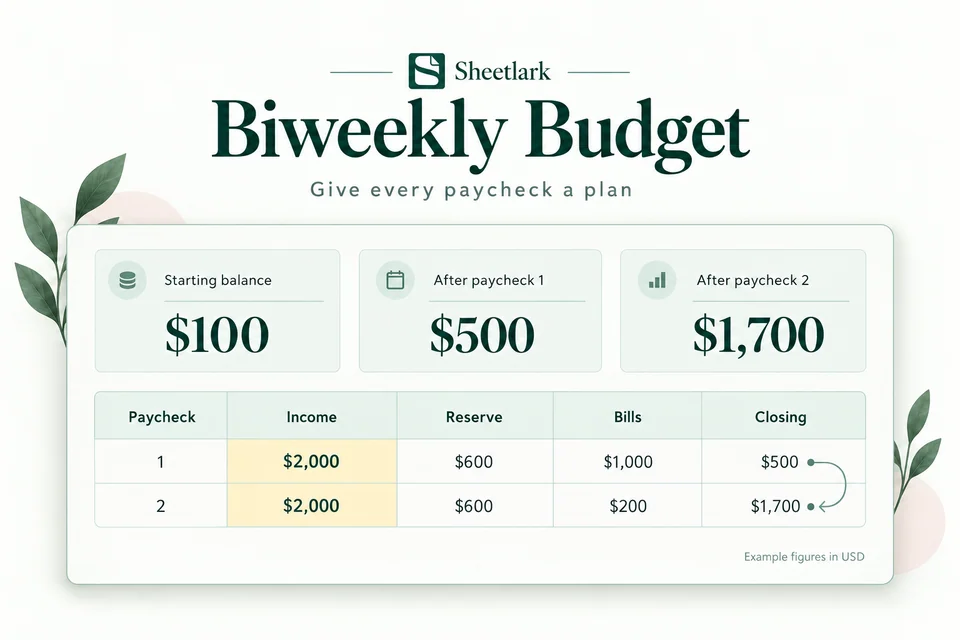
Give every paycheck a plan
Know which paycheck covers each bill. Reserve everyday spending and spot a projected shortfall before your next biweekly payday.
Get the free template
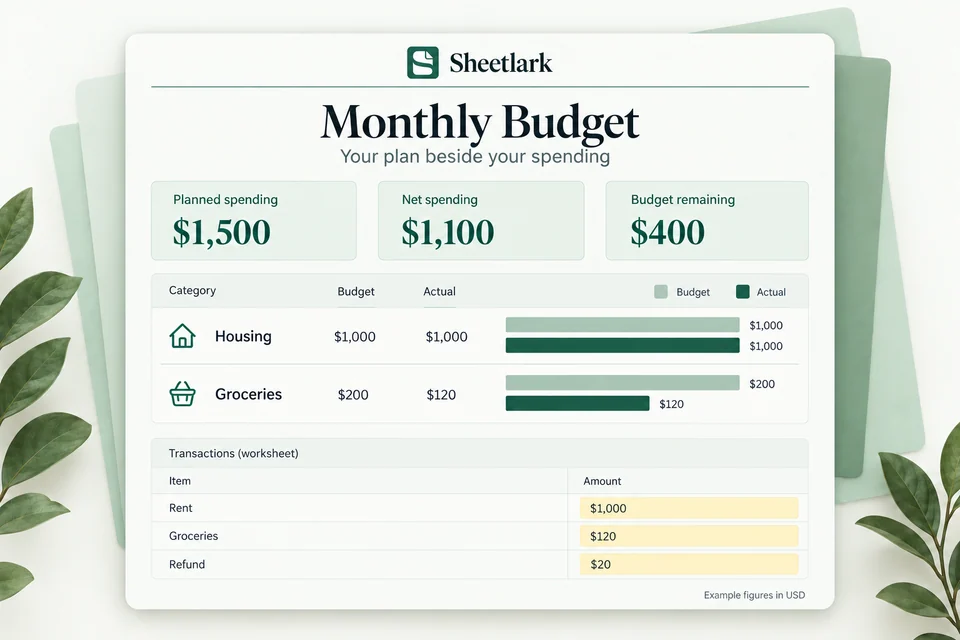
Compare plan and actual
Compare your category budgets with actual spending. Account for refunds and see what remains in your monthly plan.
Get the free template
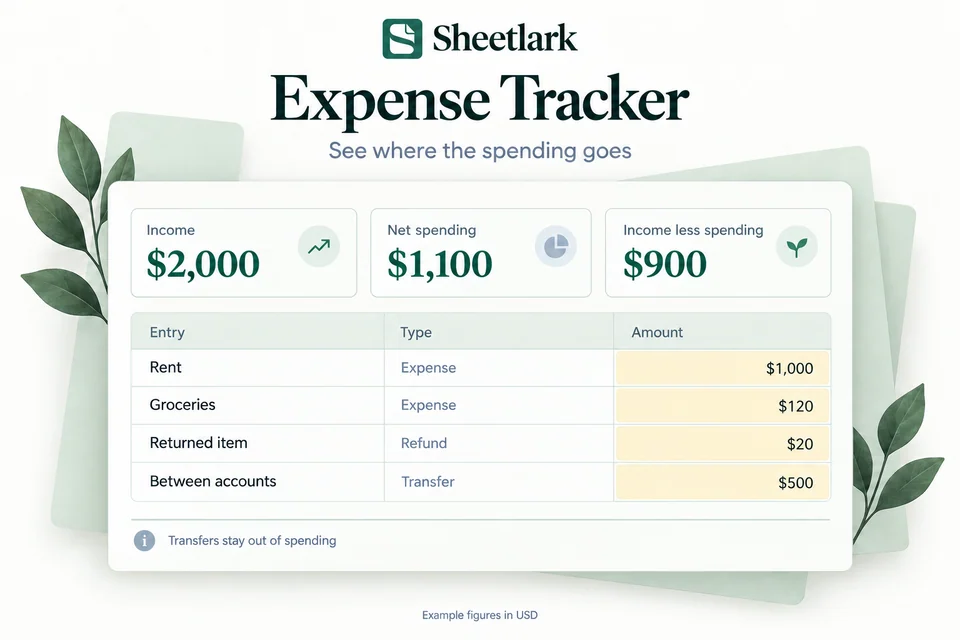
Understand everyday spending
Record everyday transactions, see spending by category, and follow your month-to-date spending without counting transfers twice.
Get the free template