Free for personal use. No payment or email required. Copy directly to Google Sheets, or import the downloaded .xlsx file into Google Sheets. Desktop Google Sheets is the supported editor.
For personal transaction records and category spending, not business accounting or reimbursement.
Includes
One workbook · 6 tabs, including setup guidance and practice examples.
Capacity
500 transactions · 13 spending categories
You’ll need
A Google account and desktop Google Sheets. Enter your numbers manually.
Manual entry with fixed categories. Expense adds spending, Refund reduces it, and Transfer is excluded. No automatic bank import. Desktop Google Sheets is the supported format.
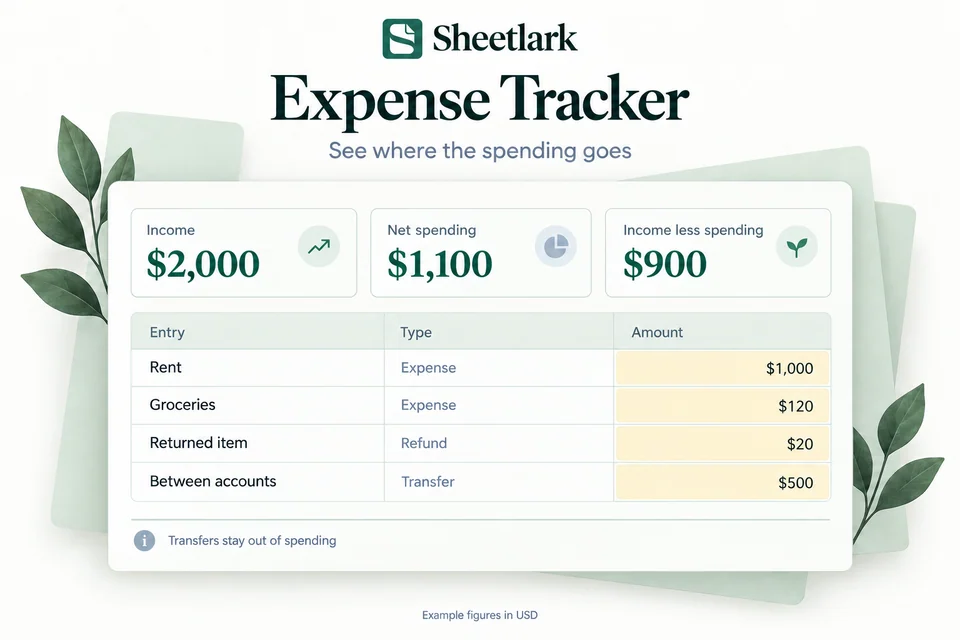
See the effect of refunds and transfers
Example figures. Your results depend on the numbers you enter.
Record $1,000 in rent and $120 in groceries, then include a $20 refund. Net spending is $1,100. A $500 transfer between your accounts stays separate from spending, so moving money does not count as another expense.
Recorded activity
Amount
Rent
$1,000
Groceries
$120
Refund
−$20
Net spending
$1,100
Income
$2,000
Income less spending
$900
The $900 is income less recorded net spending, rather than a bank balance. This example uses fictional transactions. The tracker summarizes the records you enter and does not import transactions from your accounts.
Inside the workbook
From the first step to the bigger picture.
Explore Dashboard, try a yellow input in Example, and see where your records go. The figures below are examples.
● ● ●Sheetlark / Expense TrackerSample data
See where the spending goes
Dashboard preview
Income$2,000
Net spending$1,100
Income less spending$900
Net spending by category
Housing
$1000
Groceries
$120
Shopping
−$20
Negative spending reflects a refund.
Cumulative net spending · illustrative entries
Housing is the largest spending category in this example.
Sample workbook figures. Figures use fictional inputs.
Try one transaction
Example · sample figures
Income$2,000
Net spending$1,100
Income less spending$900
Net spending: $1,100. Transfers do not count as spending.
Net spending across the example
Date
Description
Type
Amount
10/02/2026
Paycheck
Income
$2,000
10/03/2026
Rent
Expense
$1,000
10/04/2026
Groceries
Expense
$120
10/05/2026
Returned item
Refund
$20
10/06/2026
Between accounts
Transfer
$500
Sample figures in USD. The example is separate from the records in your own workbook.
Your everyday transaction log
Enter dates, preset categories, transaction types and positive amounts. Refunds reduce spending; transfers are excluded.
Date
Category
Type
Amount
10/03/2026
Housing
Expense
$1,000
10/04/2026
Groceries
Expense
$120
10/05/2026
Shopping
Refund
$20
Start with your own copy
Start Here
Create your copy
Use a Google account to copy the workbook into your own Drive after receiving your template.
Try the example
Change a yellow input in Example. Practice figures stay separate from your own plan.
Fill the yellow cells
Add your inputs, then review Dashboard. Leave formula cells intact.
No bank connection, add-on, or Apps Script authorization required. Desktop setup is recommended.
I didn't realize how quickly all my small purchases were adding up. Tracking my expenses has been a real eye-opener, especially with coffee runs and online shopping. The layout is clean and really easy to follow.
Megan FosterProject Coordinator
User review
Expense Tracker
Sometimes you don't realize where your money is going until you actually write it down. This tracker makes that process really straightforward. I've already spotted a few spending habits I want to change.
David HarrisonOperations Manager
User review
Expense Tracker
As a freelancer, I really need to know where my money goes. This tracker makes it easy to stay on top of everyday spending. It's been especially useful for keeping personal expenses from getting lost in the shuffle.
Rebecca TurnerFreelance Photographer
User review
Expense Tracker
I started using this because I wanted to cut back on unnecessary spending. It's amazing how much more aware I've become of my purchases. The spreadsheet is simple enough that I actually remember to update it.
Victoria HayesSocial Media Manager
User review
Expense Tracker
Such a helpful little tool for keeping my spending organized. I especially like being able to look back and see where my money went during the month. It's simple, but it really helps me stay accountable.
Allison BrooksReal Estate Assistant
One workbook, a clear routine
What’s inside.
One Google Sheets workbook with 6 tabs for setup, practice and your everyday plan.
Your workbook tabs
Get started
Start Here
Example
Quick Start
Plan & record
Transactions
Review your results
Dashboard
Overview
What you can do
✓
Group purchases by category
✓
Handle income, refunds and transfers
✓
Follow cumulative spending through the month
Who it’s for
For personal transaction records and category spending, not business accounting or reimbursement.
Planning capacity
Up to 500 transactions and 13 preset spending categories; archive a copy when full.
Before you begin
Use a Google account and desktop browser to create your copy. Try Example, then fill the yellow cells. No bank connection or script authorization is needed.
Choose the free copy link and save the workbook in your own Google Drive.
02
Try the example
Change a yellow input. Practice is separate from your own financial plan.
03
Fill the yellow cells
Follow Start Here, add your own inputs, and review Dashboard.
Before you choose
A clearer plan starts with the right fit.
For personal transaction records and category spending, not business accounting or reimbursement.
User review
Expense Tracker
Sometimes you don't realize where your money is going until you actually write it down. This tracker makes that process really straightforward. I've already spotted a few spending habits I want to change.
David HarrisonOperations Manager
Expense Tracker
Free · personal use
Manual entry with fixed categories. Expense adds spending, Refund reduces it, and Transfer is excluded. No automatic bank import. Desktop Google Sheets is the supported format.
Free for personal use. No payment or email required. Copy directly to Google Sheets, or import the downloaded .xlsx file into Google Sheets. Desktop Google Sheets is the supported editor.
Yes. Get a free Google Sheets copy or download the workbook for personal use. No payment or email is required.
Which format is supported?
Google Sheets for desktop use. A Google account is required to create your own copy. Excel is not an available delivery format.
Can I use it on my phone?
You can browse and try the website examples on your phone. Use Google Sheets in a desktop browser to set up and edit your workbook.
Does it connect to my bank or require a script?
No bank connection, automatic bank import, add-on or Apps Script permission is required. Enter your own numbers in your own workbook copy.
What is included?
One Google Sheets workbook with setup guidance and practice examples included as tabs. A downloadable workbook is also available for importing into Google Sheets.
What can I edit?
Use the yellow input cells and follow Start Here. Leave formula cells intact. Transaction categories are preset. Inserting extra rows does not expand the supported capacity.
How much can I track?
Up to 500 transactions and 13 preset spending categories; archive a copy when full.
Is this a subscription?
No. The current workbook is free for personal use.
How do I create my copy?
Choose Get free Google Sheets copy. Sign in to Google, then choose Make a copy to save it to your own Drive.
Where can I find setup help?
See Help for copying, importing and getting started. These free workbooks do not require a payment.