Give every paycheck a plan · Google Sheets

Biweekly Budget Template

Know which paycheck covers each bill. Reserve everyday spending and spot a projected shortfall before your next biweekly payday.

Free · personal use

Free for personal use. No payment or email required. Copy directly to Google Sheets, or import the downloaded .xlsx file into Google Sheets. Desktop Google Sheets is the supported editor.

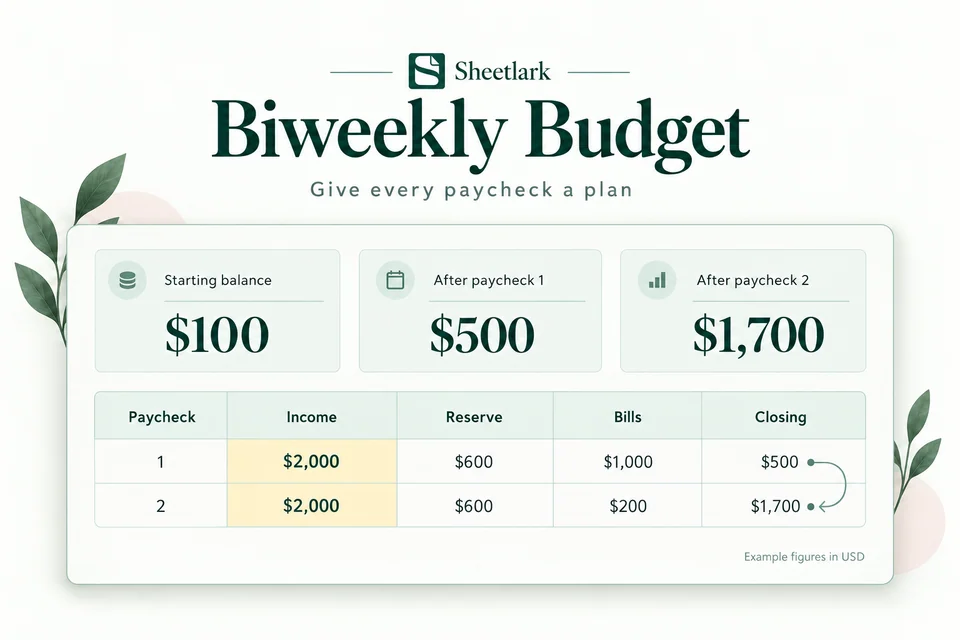
Biweekly Budget product illustration: $100 starting balance carries into projected balances of $500 and $1,700.
Product illustration · example figures. Try the interactive example ↗
Try the example first ↗
Best for
For pay arriving every 14 days, including pay periods that cross a month.
Includes
One workbook · 9 tabs, including setup guidance and practice examples.
Capacity
27 payday dates · up to 300 bill entries
You’ll need
A Google account and desktop Google Sheets. Enter your numbers manually.

Projected planning balances, not bank balances. Enter your own numbers; no bank connection or automatic bill payment. Desktop Google Sheets is the supported format.

See what’s left before the next payday

First paycheck closes at 500 dollars; 500 carries forward and the second closes at 1700 dollars.
Example figures. Your results depend on the numbers you enter.

This example starts with $100 and a $2,000 paycheck. Set aside $600 for everyday spending and account for $1,000 in bills. The projected closing balance is $500.

First pay periodAmount
Starting balance$100
Paycheck$2,000
Everyday spending reserve−$600
Bills−$1,000
Projected closing balance$500

That $500 carries into the next period. With another $2,000 paycheck, a $600 reserve and $200 in bills, the next projected closing balance is $1,700.

You can also see how a smaller paycheck affects the plan. Changing the first paycheck to $1,000 produces a projected balance of −$500 for that period and $700 for the next, with the other inputs unchanged.

These are example amounts. The workbook estimates balances from the income, reserves and bills you enter; it does not connect to your bank or make payments.

User feedback

Selected user feedback

Feedback about this template.

User review

Biweekly Budget

I love how easy it is to plan around my two-week pay schedule. Before this, I was always guessing how much money I had left after bills. Now everything is laid out clearly, and I actually look forward to checking my budget.

Ashley MorganDental Hygienist

User review

Biweekly Budget

This is exactly what I needed for my paycheck schedule. I used to struggle with figuring out which bills to pay first, but now I can plan everything ahead of time. It's simple, practical, and easy to keep up with.

Nicole ParkerMedical Assistant

User review

Biweekly Budget

Working different shifts means my paychecks aren't always exactly the same. This budget helps me stay organized even when my income changes a little. I feel much more prepared for upcoming expenses.

Samantha CooperLicensed Practical Nurse

User review

Biweekly Budget

Getting paid every other Friday used to make monthly budgeting a little confusing. This template fits my schedule perfectly. I can plan bills, groceries, and savings without constantly doing the math myself.

Matthew RobinsonLogistics Coordinator

User review

Biweekly Budget

My paycheck comes every two weeks, and this spreadsheet makes planning so much easier. I used to just check my bank balance and hope everything worked out. Now I know what's coming up before I spend anything.

Brandon ScottDelivery Driver

One workbook, a clear routine

What’s inside.

One Google Sheets workbook with 9 tabs for setup, practice and your everyday plan.

Your workbook tabs

Get started

  • Start Here
  • Setup
  • Example
  • Quick Start

Plan & record

  • Bill Builder
  • Paychecks
  • Bills

Review your results

  • Dashboard
  • Overview

What you can do

  • Assign bills to paychecks available before each bill is due

  • See balances carry into the next period

  • Generate monthly bill records, then paste values

Who it’s for
For pay arriving every 14 days, including pay periods that cross a month.
Planning capacity
365-day planning range with 27 payday dates; up to 300 scheduled bill entries. Bill Builder supports up to 10 monthly bills.
Before you begin
Use a Google account and desktop browser to create your copy. Try Example, then fill the yellow cells. No bank connection or script authorization is needed.

How to use your template.

01

Create your copy

Choose the free copy link and save the workbook in your own Google Drive.

02

Try the example

Change a yellow input. Practice is separate from your own financial plan.

03

Fill the yellow cells

Follow Start Here, add your own inputs, and review Dashboard.

Before you choose

A clearer plan starts with the right fit.

For pay arriving every 14 days, including pay periods that cross a month.

Biweekly Budget

Free · personal use

Projected planning balances, not bank balances. Enter your own numbers; no bank connection or automatic bill payment. Desktop Google Sheets is the supported format.

Free for personal use. No payment or email required. Copy directly to Google Sheets, or import the downloaded .xlsx file into Google Sheets. Desktop Google Sheets is the supported editor.

Setup help ↗

A few things
to know.

Is every 14 days the same as twice a month?

No. This workbook is for pay arriving every 14 days. Its rolling 365-day planning range includes 27 payday dates; it is not a fixed twice-monthly schedule.

Does Bill Builder automatically add or pay bills?

No. It generates occurrence records for up to 10 monthly bills. Copy the generated records and use Paste special → Values only in empty Bills rows. Check existing records before regenerating to avoid duplicates. It does not sync or pay a bill.

Is this template free?

Yes. Get a free Google Sheets copy or download the workbook for personal use. No payment or email is required.

Which format is supported?

Google Sheets for desktop use. A Google account is required to create your own copy. Excel is not an available delivery format.

Can I use it on my phone?

You can browse and try the website examples on your phone. Use Google Sheets in a desktop browser to set up and edit your workbook.

Does it connect to my bank or require a script?

No bank connection, automatic bank import, add-on or Apps Script permission is required. Enter your own numbers in your own workbook copy.

What is included?

One Google Sheets workbook with setup guidance and practice examples included as tabs. A downloadable workbook is also available for importing into Google Sheets.

What can I edit?

Use the yellow input cells and follow Start Here. Leave formula cells intact. Inserting extra rows does not expand the supported capacity.

How much can I track?

365-day planning range with 27 payday dates; up to 300 scheduled bill entries. Bill Builder supports up to 10 monthly bills.

Is this a subscription?

No. The current workbook is free for personal use.

How do I create my copy?

Choose Get free Google Sheets copy. Sign in to Google, then choose Make a copy to save it to your own Drive.

Where can I find setup help?

See Help for copying, importing and getting started. These free workbooks do not require a payment.

More personal finance templates.

Browse all templates ↗
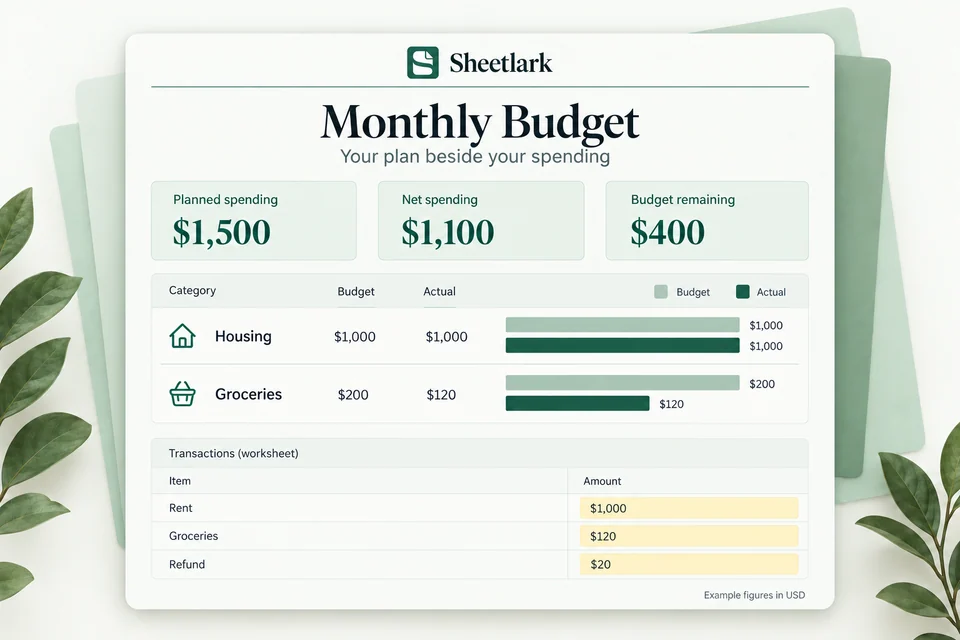
Monthly Budget product illustration: $1,500 planned spending, $1,100 net spending and $400 budget remaining.

Compare plan and actual

Monthly Budget

Compare your category budgets with actual spending. Account for refunds and see what remains in your monthly plan.

Google Sheets · best on desktopFree · personal use
Get the free template
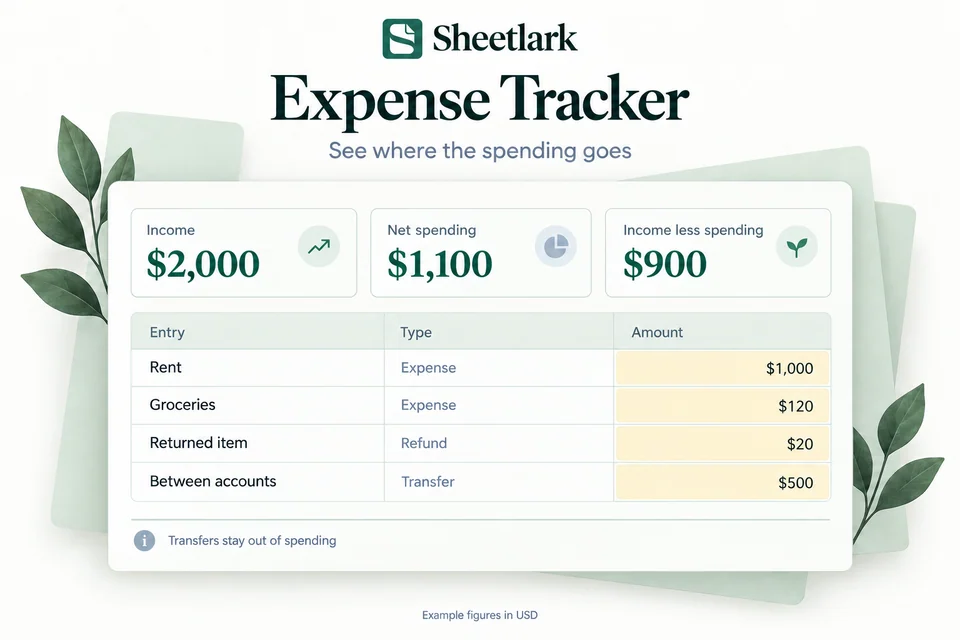
Expense Tracker product illustration with separate expenses, refunds and transfers; net spending is $1,100.

Understand everyday spending

Expense Tracker

Record everyday transactions, see spending by category, and follow your month-to-date spending without counting transfers twice.

Google Sheets · best on desktopFree · personal use
Get the free template
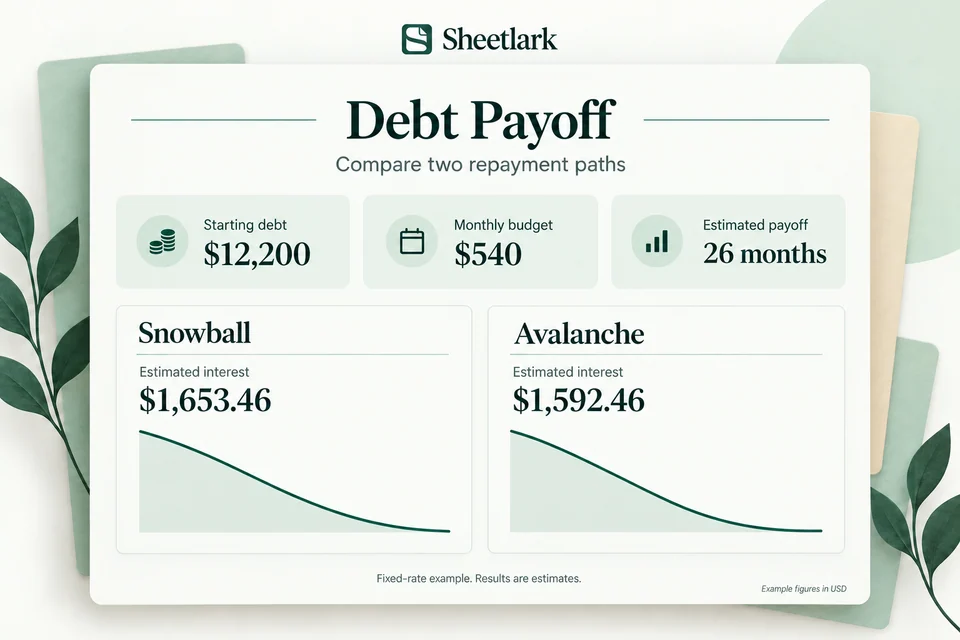
Debt Payoff product illustration comparing snowball and avalanche estimates with a $540 monthly payment budget.

Explore a repayment path

Debt Payoff

Compare snowball and avalanche payment priorities. Explore estimated payoff time, estimated interest and how extra payments change the balance curve.

Google Sheets · best on desktopFree · personal use
Get the free template

Sample preview

Your privacy choices

Your privacy preference is saved on this device. Choose whether to allow optional analytics.